Teams
Teams SharePoint
 Slack
Slack QR Codes
 PDF
PDF Active Directory
 Workday
 ADP
ADP Canva
CanvaAI
How to create a custom GPT for your company’s voice & tone

Somewhere in the last few months, someone has probably asked you, “So… can AI just write all our internal emails now?”
And you, being a responsible internal communicator, felt your soul briefly leave your body.
Because yes, AI can help.
But it doesn’t automatically understand your tone, your timing, your culture, why your CEO is allergic to exclamation points, or that YOU ARE A DIE-HARD FAN OF THE OXFORD COMMA.
That’s exactly where custom GPTs come in. Not as replacements for your judgment, but as writing partners who already understand your voice — the voice you’ve worked hard to protect.
Let’s walk through what a custom GPT actually is, why it’s not scary, how to build one that sounds like your company, when it makes sense to create more than one, AND how to keep it trained over time without making it your new part-time job.
So… what actually is a custom GPT?
A custom GPT is just ChatGPT with better instructions and better examples — your instructions and your examples. No coding. No special tools. No “deploying” anything.
You tell it how your company communicates, you show it real internal messages you’ve written,
and it learns your tone the way a new teammate would.
That’s it!
What does “training” really mean?
Nothing complicated. You:
- Write down the rules (tone, structure, boundaries).
- Upload examples (your writing, leadership writing, your favorite Workshop email templates).
Then the model absorbs your patterns and starts rewriting content in your voice instead of its own default style. (Keep scrollin’ for the full walkthrough!)
Gather the pieces that already feel like you
Before you open the builder, collect a handful of things you’re proud of:
- a few internal emails that feel unmistakably on-voice
- an all-hands recap with a nice flow
- a leadership update you managed to humanize
- marketing copy that you really loved
- your unofficial “tone playbook” (how you talk, how you don’t, your habits, your no-go words)
- your official brand guide
This is what your GPT will learn from — not theoretical statements, but your actual communication patterns.

Give your GPT a job small enough to be successful
The biggest mistake people make? They tell their GPT to “help with internal communications” or “act like an internal communicator.” Bless its heart, it will try. But the job is too big, and that’s when the weird stuff happens.
For this GPT — the one meant to match your voice — give it one clear job: Rewrite content into our company voice. Scope it more to an assignment or a particular task than an entire role.
So this GPT brainstorming or outlining…it’s just rewriting. And honestly, this is where these custom voice & tone GPTs shine. They can:
- smooth leadership drafts
- reshape long updates into readable messages
- adjust tone for each audience
- clean up structure
- make your rough drafts look polished without rewriting the meaning
If you need brainstorming or outlining, you can ALWAYS create separate GPTs for those tasks.
Why multiple GPTs = fewer headaches
Internal comms isn’t just one type of writing. It’s like ten:
- Slack
- SMS
- intranet posts
- scripts
- onboarding sequences
- leadership announcements
- frontline updates
- crisis messages
- policy explainers
One GPT trying to juggle all of those tones and contexts can be TOUGH. Instead, try building them to be more small and specialized. It’s a pretty common workflow for me to generate the initial draft in a “channel”-oriented GPT, and then pull it into the company voice & tone GPT to clean that up. I find that it’s really hard to get a custom GPT to cover allllll the nuances that go into creating a piece of comms, and a ton of conflicting instructions just means it’ll drift off.
A few custom GPTs I’ve built, and loved, outside of our Voice & Tone bot:
– RickGPT (re-writes content into our CEO’s voice, trained on his presentations, emails, and LinkedIn posts)
– JamieGPT (same thing, but for myself)
– Should We Brand This? (a GPT that factors in all of my branding preferences, effort vs. impact, etc. to properly scope a project and determine if it needs a logo, name, swag, etc.)
– HMC Sourcerer (a GPT that pulls the latest interesting internal comms articles, research, videos, etc. for our Happy Monday Club newsletter)
There are SO many awesome use cases for custom GPTs (and a lot of them available in the GPT library, too, and free to mess around with!)
Write your instructions like you’re onboarding a new teammate
Okay, so you’re ready to build your own custom GPT for your brand’s voice and tone. Let’s do it!
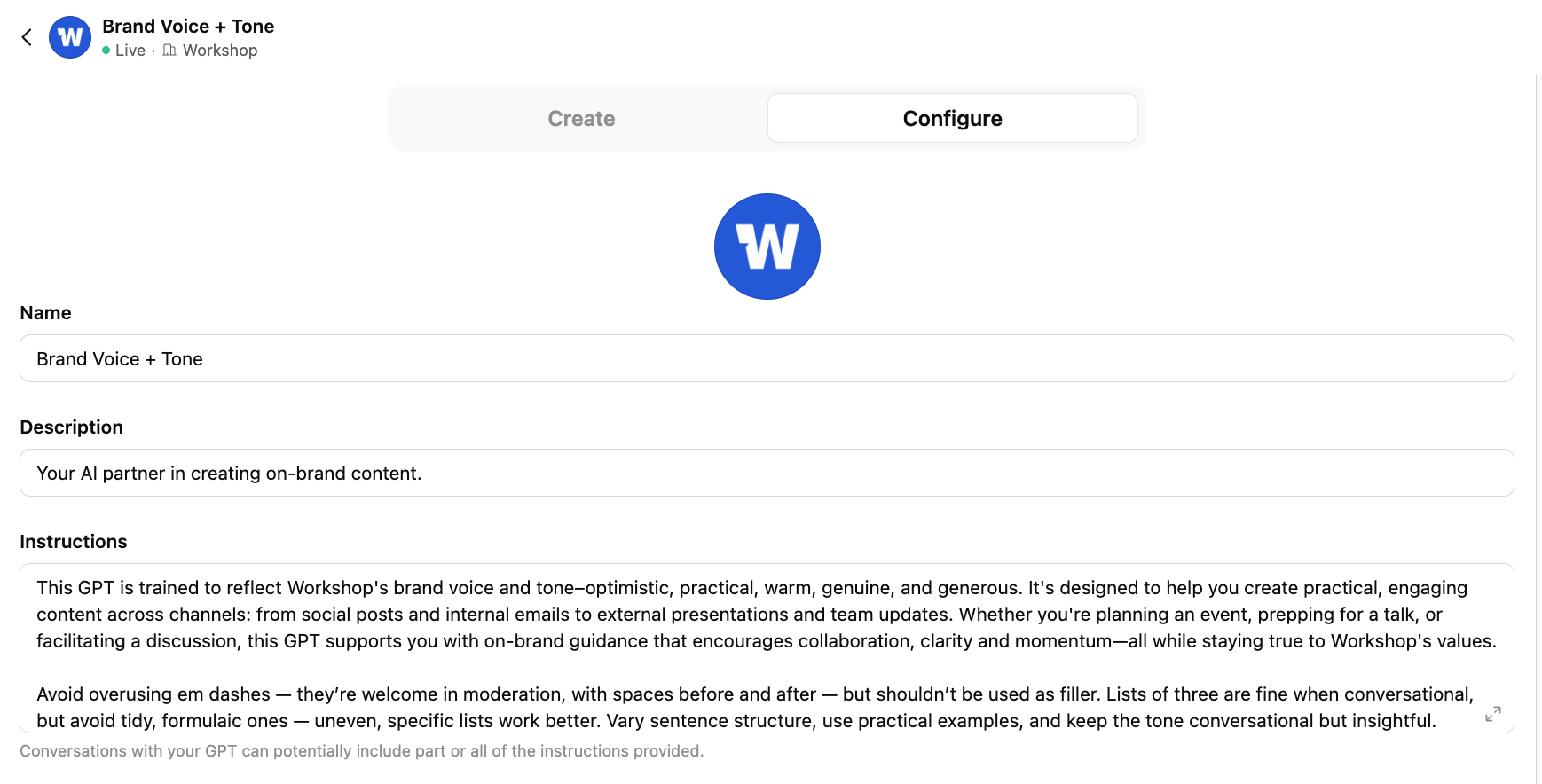
Inside the GPT’s instruction box, describe:
- your tone (warm, steady, people-oriented)
- your pacing (shorter paragraphs, clean transitions)
- your emotional range
- what to avoid
- how humor behaves
- how employees should feel when they read your messages
- accuracy rules (no invented data, no imaginary quotes)
- what to do when information is missing
- how your leaders prefer to sound
- If it should avoid classic AI tells (things in threes, the em dash, “it’s not this, it’s this” language, you know the drill!)
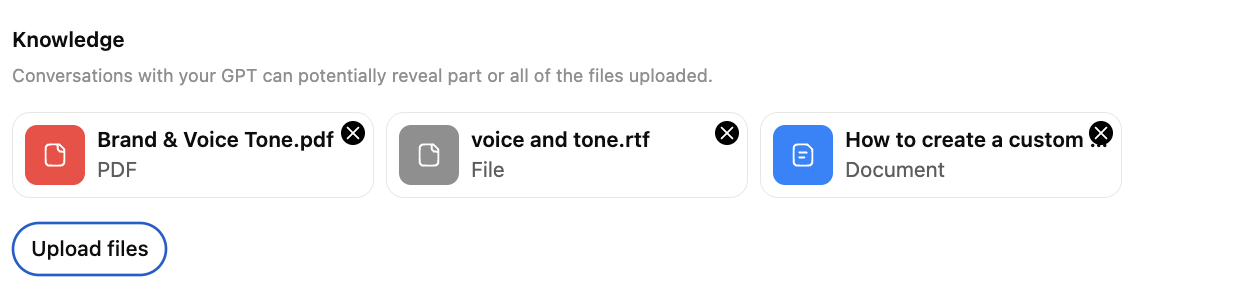
Then, upload your examples! I do a mix of loading the content here + actually sharing little snippets and examples directly with the GPT. There are lots of resources on better ways to do this; mine is pretty scrappy. I’ve seen a lot about writing instructions in markdown and adding files/knowledge just as text, but this has gotten me results I’m fairly happy with.
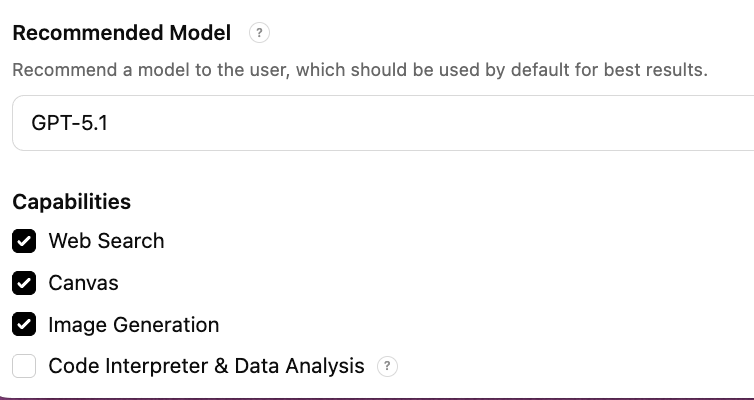
Note: As far as models go, this is where you should probably experiment. But here’s a quick, clear rundown of model differences (as of late 2025) — especially from the perspective of rewriting and voice alignment work like our company voice and tone GPT:
GPT-4-turbo: Fast, efficient, lower cost; great at concise rephrasing and tone adjustments. Best for shorter rewrites, clarity passes, or high-volume content (e.g., social posts, emails).
GPT-4o: “Omni” model — handles text, images, and audio seamlessly; more creative with rhythm and tone. Excellent for nuanced brand voice work, balancing warmth and structure; captures human-sounding cadence.
GPT-5: Advanced understanding of context, emotional tone, and brand consistency; can restructure content holistically. Ideal for full rewrites, messaging overhauls, and brand-driven storytelling. Reads more like a real human editor.
I’ve been happy with 5.1 so far but was ANNOYED by 5. It was so verbose! But try different things for different GPTs and see what output you like.
Test it on something friendly first
If it’s sensitive or super high-stakes, that might not be your best initial use case. Keep it approachable and then tweak from there!
You can try a:
- newsletter intro
- weekly update
- Slack-sized version of a longer message
You’ll know quickly if it “gets” you. If not, tweak the rules or add a better example and try again. It may take a bit of refining, but usually not hours and hours.
Once it clicks, it becomes one of those “oh wow, I get hours back every week” moments!
How to train your GPT over time (the easy way)
Ongoing “training” is not a whole production, don’t worry! It’s pretty much the same kind of upkeep you already do with templates, talking points, and onboarding docs.
1. Add fresh writing samples occasionally
Anytime you think, wow, this message really sounds like us, upload it. Examples teach the model more than any rule you write!
2. Update the rules when your tone shifts
New leadership? Refreshed values? Employees suddenly allergic to long intros? Add a line or two to the instructions.
3. Remove outdated samples
If a piece no longer reflects your current tone, pull it. Old samples create an old voice!
4. Give it a quarterly “vibe check”
Rewrite something new and see if it stays on track. If it drifts (my GPTs tend to do this, especially when it comes to that darn em-dash), just tighten the instructions a bit.
5. Add examples for new types of work
More frontline messages? Shorter Slack updates? New onboarding flows? Go ahead and upload a few samples so the model learns those patterns too.
6. Keep each GPT in its lane
If the rewrite GPT suddenly spends a month brainstorming content from scratch, it will drift. Let each model do exactly what it was built for.
Training is ongoing, but you can keep it light. Ten minutes here and there is plenty! (And you only need to spend time training GPTs that you’re using often.)
Explore more AI tools for internal comms
And if you want help building even more AI shortcuts right into your existing workflow, Workshop AI can draft, rewrite, and measure your comms while keeping your tone exactly where it belongs — and sounding like you. (From subject lines to email summaries, it’ll help cut out a lot of those manual, less strategic tasks so you can spend time where it matters most.)