Teams
Teams SharePoint
 Slack
Slack QR Codes
 PDF
PDF Active Directory
 Workday
 ADP
ADP Canva
CanvaInternal Communication | Metrics
10 ideas to help you measure your internal communication


As internal communicators, you know it’s not enough to just send the message. The work only truly matters if it’s actually reaching employees and making an impact!
But here’s the thing…most of us don’t have the time, tools, or space to step back and measure that impact. Not because we don’t want to, but because we’re in it every day. We’re fielding last-minute requests, launching new initiatives, juggling multiple channels, and keeping everything running behind the scenes. The pace is fast. The expectations are high. And measurement often gets pushed to the bottom of the list.
Even when we do look at the data, it’s not always clear what to measure or what the numbers really mean. Are open rates enough? What if no one clicks? Should we be reporting on engagement across Slack, email, SharePoint, and everything else, or is that too much?
You’re not alone in asking these questions. We’ve talked to hundreds of comms professionals who want to be more strategic about metrics but aren’t sure where to start. They’re looking for a set of practical, realistic ways to measure success. Something that helps them track what matters, tie comms to business goals, and make confident decisions without needing a background in data analytics.
Below, you’ll find 10 ideas to help you measure your internal communications in a way that’s useful, approachable, and aligned with the work you’re already doing. These aren’t just vanity metrics or high-level theory, either; they’re grounded in the day-to-day of internal comms, and designed to give you insight you can actually act on!
Whether you’re a team of one or part of a large internal comms department, having the right metrics in place makes your work more targeted, strategic, and effective (not to mention, helps show the ROI and gain buy-in from leadership)! In this article, we’ll walk through 10 actionable ways to measure internal communications. Each one includes practical tips and examples, along with tools and features from Workshop to help you put the insights into practice.
Want to skip ahead to the numbers? Download our Internal Communications Metrics Dashboard Template to get a head start.
1. Start with email engagement
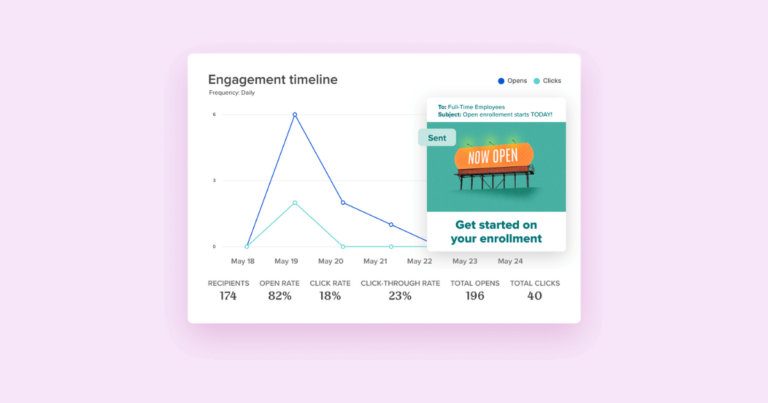
You’re probably sending updates, announcements, or newsletters through email. But are people opening them? Clicking the links? Actually reading what you wrote?
These are your basic internal communications metrics we recommend tracking.
What to look at:
- Open rate (Did it get their attention?)
- Click-through rate (Did they care enough to click?)
- Read time or scroll depth (Did they read it?)
- Time read (How long are employees spending on the content?)
- Metrics by department, role, location, etc. (Is there a group of employees who are more engaged?)
- Survey data (What are employees saying?)
Our free Internal Communications Metrics Dashboard is a great starting place to gather all of this data in one place! But of course, it’s easier to track these metrics with an internal communications tool. Workshop automatically tracks these analytics (and more) for every email you send.

2. Track campaign engagement
Every internal campaign has a goal. Maybe it’s getting employees to enroll in benefits, complete required training, or show up for an all-hands meeting. If people didn’t take action, the message may not have landed the way you hoped.
That’s where internal comms analytics really matter because they help you understand if your message made an impact and where you might need to follow up.
Here’s what to track:
- Open and click rates across the entire campaign
- Top-performing messages based on engagement
- Read time and scroll depth for each message
- Audience breakdowns by department, location, or role

Workshop helps you pull all of this into one place so you can measure outcomes and optimize along the way. With Workshop’s campaign feature, you can group related messages together (like your all-hands follow-up emails or CEO updates) and track them as one cohesive effort — easy peasy!
These kinds of insights make a strong case for comms! Plus, they help you deliver better results next time.
3. Compare channel performance
You’re probably using multiple channels in your internal comms toolkit, including email, Slack, Teams, intranet, digital signage, and more. But are you measuring which ones are actually working?
Different audiences will have different communication preferences. Your frontline team might love text alerts. Your HQ folks might prefer email. Here at Workshop, we always say that you’re not going to reach 100% of your employees through just one channel. We recommend having a good mix (here are our top four recommendations!) to meet your employees where they’re at.
But when looking at comparing metrics in different channels, here’s what we recommend tracking:
- Engagement by channel (opens, clicks, reactions)
- Reach or delivery rate
- Repeat visitors to key pages
- Message type performance by channel
This is easiest to track with an internal comms tool. With Workshop, you send comms across multiple channels at once and track analytics for each one. Think: one message + a ton of insights!
4. Segment your audience
A 100% open rate doesn’t mean much if it’s only from one department. Measuring internal communications metrics by audience group gives you a much clearer picture.
If you want to experiment with segmentation, just try it manually with your next comms send! Carve off one department, send them a copy of the newsletter, and you’ll be able to compare them to the “average” across the rest of the company. Of course, using an internal email tool will help save you time because you can segment your newsletters and the analytics without having to create multiple sends, all within one dashboard.

And if you’re just starting out with audience segmentation, focus on your obvious audience segmentation wins first! It can be so tempting to sit down and think of all the potential ways you can segment your employee distribution lists, but don’t! Don’t spend too much time on this. Look at the areas in your business that are likely to result in the most positive impact as a result of that segmentation, and start with simple properties (or one particular campaign).
A few of our favorite recommendations are to segment your employee newsletter by location, department, team, and job title. If one group consistently underperforms, that’s a sign to dig deeper (or change your delivery method).
5. Monitor message volume
Sometimes, the issue isn’t what you’re saying, but it’s how often you’re saying it. If employees are getting five updates a day, it’s no wonder they’re tuning out. Too much noise makes everything feel like background.
Try looking at:
- Total messages sent per week
- Messages per team or department
- The time between important updates
- Overlap across channels
- Employee feedback or survey responses about message volume
This is where a communications calendar can be a game changer! Our free Internal Communications Editorial Calendar is the perfect place to start mapping out your holidays, key dates, and all the things you’ll want to communicate in one easy-to-use, comms-focused editorial calendar! It even has pre-filled holidays and a few example blocks to help you get started.
If you’re looking for more of a holistic view of all of your comms across the entire company, we can help! Workshop has a communications calendar built directly into the platform, giving you a clear, shared view of everything that’s scheduled, in progress, or still in draft mode (You can even include quick notes or blackout dates)!
6. Measure long-term content performance
Not every message is tied to a specific announcement. Some of your most valuable content is evergreen. These will be resources like onboarding materials, company policies, DEI commitments, or how-to guides. These communications might not get daily traffic, but they should still be easy to find, up-to-date, and relevant.
It’s worth checking in on this content regularly to see if it’s doing its job.
Here’s what to keep an eye on:
- Page views over time (Is the content still being accessed consistently, or at all?)
- Last accessed date (When’s the last time someone actually opened it?)
- Search terms used to find it (Are people looking for the right thing and landing in the right place?)
- Referral sources (Where are people finding the content, whether that’s from email, intranet search, or shared links?)
- Internal feedback or requests (Are teams asking for information that already exists somewhere?)
If something important hasn’t been opened in six months, it’s not always a sign to delete. It might just need a better title, easier access, or a little extra promotion! A quick update or timely reminder can go a long way toward keeping these resources useful and visible.
7. Ask for feedback and track sentiment
Never discount the power of qualitative data! If you’re getting feedback from employees that they love a particular section of the newsletter, or they’re looking forward to getting the next one…count it! Those measures of success should be celebrated, too.
If there is a particular piece of qualitative feedback that made your work feel validated, put it into a file! We like to put these in a folder that we call a “smile file.”
As a baseline, here is the qualitative feedback we recommend tracking:
- Pulse surveys
- Emoji reactions
- Number and quality of comments, feedback, and suggestions received
- + are people asking you to put stuff in the newsletter?!
Pair these with other internal communications analytics to get the full story (i.e., who read it and how they felt about it).
8. Analyze traffic to your resource hub
If you’re pointing employees to a centralized hub for updates, documents, or FAQs, it’s important to know what happens after they click. Are they finding what they need? Are they sticking around? Are there pages no one’s even opening?
Whether it’s a full-blown intranet or a shared drive with better branding, your resource hub should be easy to navigate and actually helpful. That only happens if you’re keeping tabs on how people are using it.
Here’s what we recommend tracking:
- Number of visits (How many people are landing on the page, and is that number growing over time?)
- Time spent on each page (Are they reading the full content or skimming and bouncing?)
- Drop-off points or bounce rates (Where are people exiting, and what might be confusing or unnecessary?)
- Top-performing resources (Which docs or pages are getting the most attention?)
- Search behavior (What are employees looking for, and are they finding it easily?)
If the traffic’s low or drop-off is high, don’t panic! It might just mean your content needs a clearer path from email, better labels, or a quick redesign. A few small tweaks can turn a static library into a tool employees actually rely on.
9. Benchmark against your past
Having an understanding of how your team engages with internal comms is key to building a strategy that prioritizes what they’re (actually) interested in — and that starts with benchmarks! But, benchmarks aren’t about chasing perfect numbers. They’re about creating a baseline to measure what’s working and where there’s room to grow!
Here are a few benchmark data pieces we recommend tracking:
- This month’s email metrics vs. last month
- This quarter’s engagement vs. the previous one
- Event participation year-over-year
- Subject line engagement over time
- The best day/time to send internal emails
Internal Communication Benchmarks & Best Practices
Benchmarks & best practices from over 180 million emails from 580 companies worldwide!
Grab your copy →
Grab our free 2026 Internal Communications Benchmarks Report to get a couple of great takeaways on internal email benchmarks for your industry! Curious about the best time to send an email? According to our data, it’s 9 AM on Mondays. (Find more helpful tidbits in our report!).
But one piece of advice…while industry benchmarks can be helpful for context, the most important thing is to focus on what’s meaningful for your team and goals. Setting your own benchmarks helps you measure progress and celebrate wins, no matter how small. If your open rate is 60% and the “gold standard” is 80%, that doesn’t mean you’re failing. It means there’s a great opportunity to fine-tune your approach! Every improvement is a step in the right direction.
10. Measure leadership visibility
Messages from leadership are some of the most important ones you’ll send. They shape company culture, build trust, and help employees understand what really matters.
To see if these messages are landing, here’s what’s worth tracking:
- Views or attendance (Did employees open the message, watch the video, or attend the live session?)
- Employee comments or questions (Are people engaging with it by responding, asking questions, or reacting?)
- Reactions and feedback (What kind of sentiment are you seeing – supportive, confused, mixed, or silent?)
- Follow-up engagement (Do future messages or initiatives see a boost after a leadership update?)
- Format trends (Are certain approaches, like short videos or informal Slack updates, getting more traction?)
If engagement is low, the content might not be the problem. It could be about when the message was sent, how it was delivered, or how often employees hear from leaders. A small shift in format or tone can go a long way in making leadership more visible and more trusted.
There’s also no better way to gain leadership buy-in than showing them the analytics and impact of their comms & messages! 😉
And a few final thoughts…
Internal comms deserves a seat at the table! But getting there? That starts with showing the impact of your work through thoughtful measurement, intentional strategy, and a whole lot of heart.
You don’t need to be a data whiz to make it happen. With a few clear metrics, the right tools, and a plan built around your people, you’re well on your way. That’s where Workshop can help. From multichannel publishing to built-in analytics, we make it easier to see what’s working, share it widely, and lead with confidence.