Teams
Teams SharePoint
 Slack
Slack QR Codes
 PDF
PDF Active Directory
 Workday
 ADP
ADP Canva
CanvaInternal Communication | Metrics
Internal mail: Benchmarks, best practices and what actually works in 2025


You’ve got (internal) mail: benchmarks, best practices and what actually works in 2025
You’ve carefully crafted your internal newsletter, triple-checked for typos and added a GIF of Pedro Pascal doing something quirky and endearing. And then… nothing.
No replies. No click-throughs. And when you check the metrics? Only 33% of employees even looked at it.
We get it. Between overflowing inboxes and back-to-back meetings, most employees barely have time to skim their emails, let alone respond. And with internal messages competing for attention alongside everything else, it’s harder than ever to tell if your internal emails are actually landing. But here’s the thing: open rates still matter. A lot.
That’s why we dug into the data — over 100 million internal emails sent through Workshop — to uncover what actually works. Using that information, we’ve gathered real-world benchmarks, smarter strategies and simple changes you can make to give your messages a better shot at even being seen (and maybe even appreciated). Let’s dive in.
Looking for the 2026 Internal Communications Benchmarks & Best Practices Report? Check out the report for this year’s findings including data around internal email, SMS, Journeys, and Pages! Or, keep reading to see the data from our 2025 report. 🙂
Timing is everything (literally)
You might think internal emails are immune to timing — but our research says otherwise. When you send your message can make or break whether it gets seen at all. In fact, emails sent after 5 PM see a 17% drop in open rates. Think about it: by the end of the day, employees are often rushing to wrap up tasks, mentally transitioning to their personal lives and definitely not eager to dive into a company-wide email when they’re rushing home to catch up on Desperate Housewives (or, more likely, picking up the kids and getting dinner started).
Sending important communications during these wind-down hours means your message is likely to get lost in the shuffle, skimmed quickly or simply left unread until the next day — a risk you might not want to take if your email is particularly urgent.
But here’s what the data says about when you should send your internal communications:
The best day to send: Wednesday
While Mondays are often chaotic with catching up from the weekend and planning the week ahead, and Fridays see a noticeable dip in engagement as people anticipate the weekend, Wednesday hits the sweet spot. It’s midweek, employees are typically settled into their routines and they’re often more receptive to new information before the pre-weekend slowdown begins. It avoids the initial rush and the end-of-week fatigue, positioning your message to be seen when attention levels are typically higher.
The best time to send: 9:00 AM local time
It’s right after the start of the workday for most folks, but it’s not too early. 9:00 AM allows people time to settle in, grab their coffee, check initial urgent emails and mentally prepare for the day. Sending earlier, say at 7 AM, might mean your email gets buried under the deluge of new messages that have accumulated overnight. But sending later in the morning risks competing with scheduled meetings, project deadlines or the dreaded mid-day slump. A 9:00 AM send time ensures your message lands just when employees are actively engaged and receptive, rather than distracted or winding down.
It’s not just about timing, though. It’s timing and tools. Sending with platforms like Outlook or Mailchimp might delay delivery or strip sender info. But this is where a purpose-built platform like Workshop truly shines. With Workshop, you gain the ability to schedule communications based on each employee’s local time zone. Imagine the difference: an announcement intended for 9 AM for your team in New York will also reach your colleagues in London at their 9 AM — and your team in Tokyo at their 9 AM. This seemingly small detail drastically increases the relevance and timeliness of your messages, ensuring every employee receives your communication at the optimal time.
Finding the right send cadence (so you don’t burn people out)
You know what tanks open rates faster than a bad subject line? Email overload. It’s tempting to over communicate — especially when there are org-wide updates, new initiatives, benefits reminders, CEO notes and that one team that wants their survey sent out again. But sending too frequently can lead to email fatigue. And once your audience tunes you out, it’s tough to win them back.
Lots of teams struggle to strike the right balance with this. The best-performing internal comms programs send regularly, but intentionally — not constantly. So, how do you find your cadence sweet spot?
Bundling: Combine less time sensitive messages into a single digest or weekly roundup.
Be predictable: A weekly or monthly cadence sets expectations and builds trust.
Watch for signs of fatigue: Dropping open rates over time might be a signal that you’re sending too often.
Ask your audience: Seriously. A simple poll can tell you if your comms are helpful or overwhelming.
Plus, with Workshop, you can view campaign trends over time, spot declining engagement and compare performance across different send frequencies — so you’ll know if you’re hitting inboxes too hard (or not enough).
Subject lines that don’t scream “delete me”
Subject lines are your first line of defense against ignored emails. They’re the headline of your internal comms — and they matter more than you might think. The sweet spot? 21-40 characters. More than that, and you risk losing your audience. Our data shows that open rates drop off noticeably once subject lines pass 80 characters. Stick with clear value or urgency, and speak directly to what matters to your readers. And yes, emojis do still work — just use them sparingly. (This isn’t a group chat.)
Want to see what we mean? Here are a few examples you can adapt for your business:
- ICYMI: [Event name] Recap + Recording 🎥
- We’ve Got Big News (and Bagels 🥯)
- Open Enrollment Ends This Friday ❗️
- Meet the New Team Members (You’ll ❤️ Them)
- Quick Survey: What Should We Tackle Next?
The common thread? They’re all short, clear and human. No jargon. No filler. Just a compelling reason to open. And yes, Workshop makes it easy to test and preview your subject lines, compare results from different departments or audiences and even see how your campaigns stack up over time.
Looking for more email inspo? We pulled together our top tips for crafting the perfect subject line.

Don’t sleep on pre-header text
Subject lines may get all the glory, but pre-header text is the unsung hero of your open rate. It’s that little gray line that shows up next to or underneath your subject line in most inboxes — and it’s prime real estate. In fact, if your subject line is what gets your reader’s attention, your pre-header is what seals the deal.
Here’s what we know: Pre-header text that adds context or creates curiosity drives better open rates. And in a mobile-first world (where 60% of internal emails are opened on phones), it’s even more important to nail that first glimpse of your message.
Some best practices for pre-header text:
Support your subject line.
If the subject line is about an all-hands team meeting, your pre-header could be something like, “Starts at 10am sharp — join us live or catch the replay.”
Avoid repetition.
Don’t just copy the subject line into the pre-header. Use it to expand, tease or even clarify.
Front-load the important stuff.
Most pre-headers get cut off after 40-60 characters, especially on mobile. So put the good stuff up front.
Testing, testing, testing.
Just like subject lines, pre-header text is worth refining to get the right results. Workshop’s AI suggestions can even help you draft options based on your email’s tone and content.
The smaller the list, the bigger the lift
Not every email needs to go to everyone. In fact, it probably shouldn’t. One of the clearest data points from our research is this:
Emails sent to fewer than 1,000 employees consistently see the highest open rates.
Smaller means more targeted. And more targeted means more relevant. Relevance gets people to click. That means: making sure you segment by department, role or location; personalizing the sender (e.g., Jazmyn from HR vs. Human Resources Department); and sometimes, ghostwriting on behalf of your executives or team leads.
Even a simple tweak, like sending a message “from” a manager rather than the comms team — can increase open rates significantly. People open emails from people they know. (Wild, right?) Workshop makes segmentation easy, so you can send the right message to the right people, without the craziness of a 20-page spreadsheet to keep track of it all.
When your tools work with you (not against you)
If you’re still sending internal emails through your marketing platform or basic distribution list… oof. We get it. But your tools might be quietly sabotaging your open rates. Emails sent via general-purpose platforms (like Mailchimp, Outlook or Gmail) are more likely to:
- Get flagged with external sender warnings
- Be delayed due to throttling
- Appear impersonal or automated
And because most of these platforms weren’t built for internal comms, you might also be flying blind when it comes to analytics. No visibility into who opened what. No A/B testing. No support for audience segmentation. That’s why Workshop was designed from the ground up for internal communication, with features like:
- Sender personalization
- Time zone-aware delivery
- Real-time analytics and campaign tracking
- Pre-send previews so you can test how emails look across devices
You don’t need to work harder to get better open rates. You just need tools that were actually built for what you’re doing.
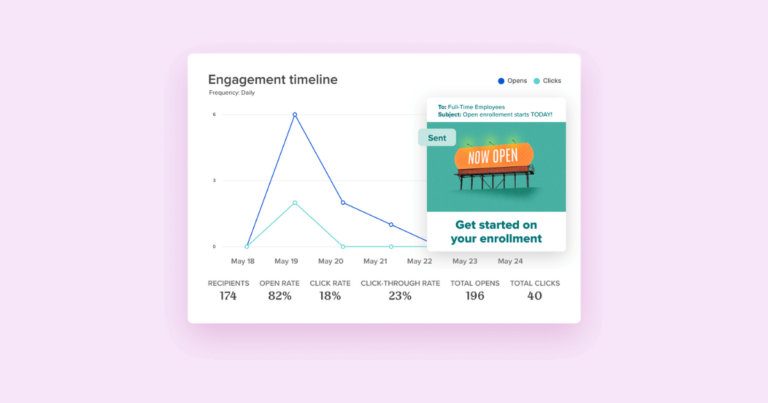
So…what is a good open rate, anyway?
We get this question a lot. And the honest answer is: it depends.
While the average internal open rate across all industries is 76%, that number can vary widely depending on the size of your company, your industry (your company’s culture 👀) and even how and when your internal comms emails are sent.
For example, finance and healthcare tend to perform above average, while tech and SaaS companies fall a bit lower. And compared to larger enterprises, smaller companies with fewer employees typically have higher open rates.
Our advice? Instead of chasing a 100% open rate (seriously, don’t do it) we recommend using email as a solid foundation for communicating with your company, then building on that by meeting employees where they are. Consider using channels like SMS, chat-based apps like Slack or Teams, company intranet or marketing materials like signs, posters and more.
Track, tweak and repeat
Here’s the truth: even the best internal comms teams don’t get it right on the first try. But what sets them apart is how they measure, learn and improve. They don’t obsess over a single open rate, but instead, they watch for trends over time. Ask yourself:
- Is your open rate going up?
- Do emails sent by certain people or departments perform better than others?
- Are there specific subject lines or send times that consistently win?
Combine that with qualitative feedback and you’ll start seeing what truly resonates with your team. If you’re struggling with open rates, try setting your own benchmark, then try to beat it. And if you’re stuck? Tweak one thing per email — start with your subject line, sender or send time — to see what moves the needle.
Data’s great — but don’t ignore the human signals
Open rates tell you if someone clicked — but they don’t tell you if they cared.
That’s why the smartest internal comms pros pair their metrics with something just as valuable: qualitative feedback. The little things. The human things. The Slack messages saying, “Loved the new format.” The email reply from a frontline manager saying, “Thanks for making this easier to understand.”
Teams that combine qualitative and quantitative insights are more likely to improve their performance over time, because they’re actually listening. We put together some of our favorite (and easiest) ways to gather feedback, below.
- Post-send polls: Add a quick “Was this helpful?” or “What would you like to see next?” link at the bottom of newsletters.
- Engage internal champions: Ask a few trusted folks in each department to share what’s landing and what’s not.
- Look for patterns: If people keep saying your emails are too long, they probably are.
- Track “informal wins”: Save the compliments, thank-yous and kudos that signal something’s working.
And the best part? When people feel heard, they’re more likely to engage next time. It’s a feedback loop in the best sense.
Wrap-up: keep it real, keep it useful
Open rates often get written off as a vanity metric. But we see them differently — more like a pulse check. A quick, essential signal that tells you whether your message even had a chance to be seen. And in a world of nonstop notifications, stacked calendars and inbox fatigue, that signal still matters.
For internal comms teams, it’s not about chasing perfect numbers. It’s about making sure the right messages actually reach the right people — clearly, consistently and at the right time. See how Carson Group has used Workshop’s analytics to improve their internal comms!
So whether you’re hovering around a 40% open rate or cruising past 80%, keep experimenting. Test your timing. Tighten your subject lines. Ask for feedback. Because when your message lands? It can align teams, clarify priorities and build culture.
And that’s the whole point.
Next steps:
Don’t miss out. Find out how your industry stacks up when it comes to email open rates by downloading our 2026 Internal Communication Benchmarks & Best Practices Report. It’s your go-to guide for understanding what’s really working in internal email, compiled using data from hundreds of companies and teams of all sizes (from 100 to 100,000+ employees). Inside, we break down the numbers and translate them into practical, easy-to understand insights for internal comms pros, giving you helpful benchmarks to measure your success and level up your strategy.